Peraiz
Peraiz Logo

Dec 16, 2025|Jully

AI Video Generator Reddit: Practical Beginner Guide to Using Crayo AI
AI Video Generator Reddit: Practical Beginner Guide to Using Crayo AI
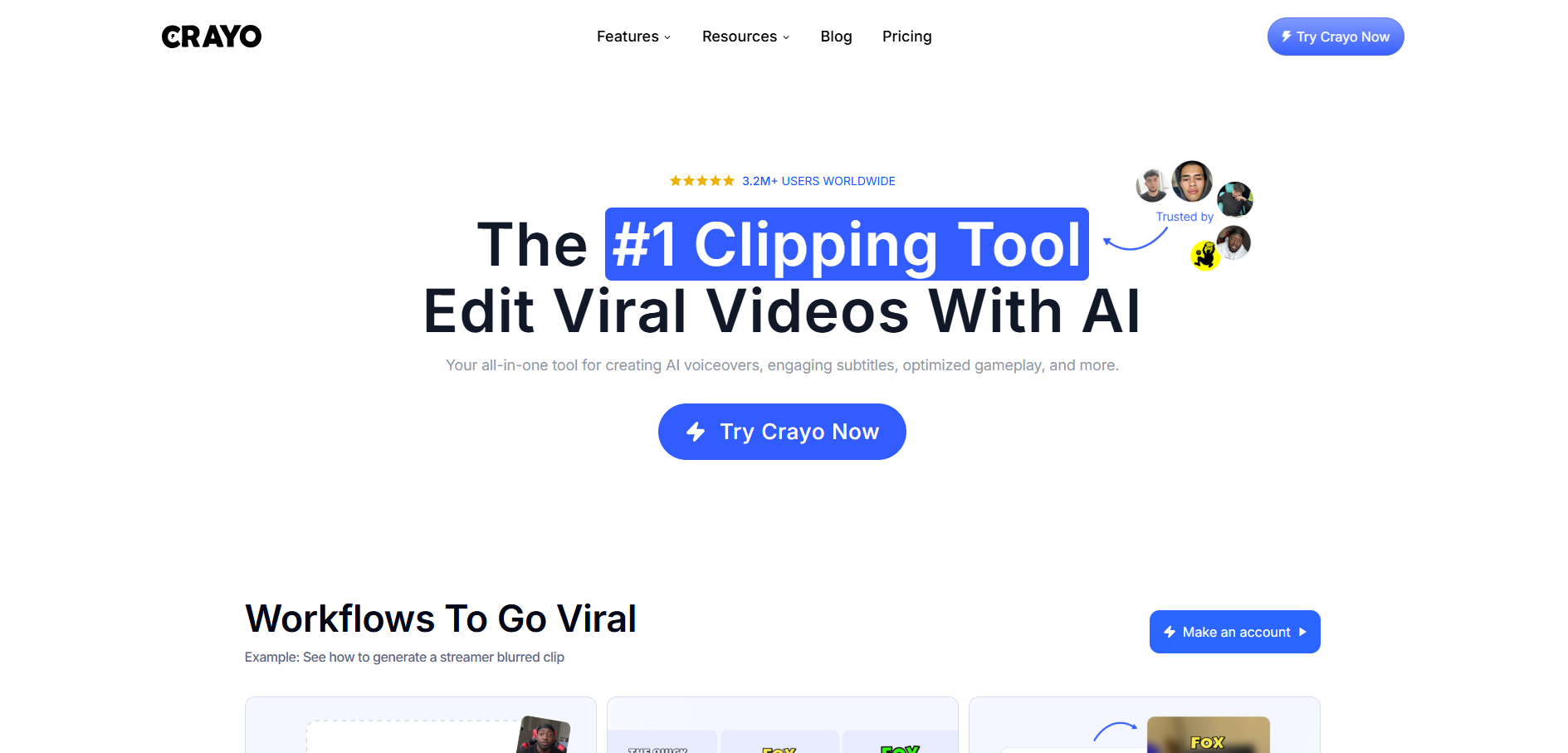
Short-form video creation has become a core growth channel for creators, marketers, and faceless content brands. If you’ve searched on Reddit for real AI tools that actually work, you’ve probably seen Crayo AI mentioned repeatedly in discussions around automated short videos.
This guide is written for beginners who want a practical, up-to-date explanation of how Crayo AI works today — without exaggerated promises. We’ll walk through its real workflow, strengths, limitations, and where it fits in the current AI video landscape.

What Is Crayo AI?

Crayo AI is an automatic video editor AI built specifically for short-form videos. Instead of using a traditional timeline editor, Crayo automates many repetitive tasks such as:
  • Generating short clips from ideas or existing videos
  • Adding subtitles optimized for mobile viewing
  • Creating faceless videos at scale
  • Repurposing long videos into Shorts, Reels, or TikToks
Crayo is often described as an AI video generator from video, rather than a full creative editing suite. Its core focus is efficiency, not advanced cinematic control.

Why Crayo AI Is Frequently Mentioned on Reddit

When people search AI video generator Reddit, they’re usually looking for:
  • Tools that actually save time
  • Honest pros & cons
  • Whether the tool is usable for faceless content
Crayo often appears in Reddit threads because:
  • It doesn’t require advanced editing skills
  • It works well for story-based and text-driven videos
  • The output is predictable and consistent
However, Reddit users also frequently mention that Crayo is not a replacement for professional video editing software.

Crayo AI Workflow

Crayo’s current workflow is structured into 5 clear steps:

Step 1: Sign Up or Log In

Go to the Crayo AI website and create an account using email or Google. The dashboard is clean and easy to navigate, even for first-time users.

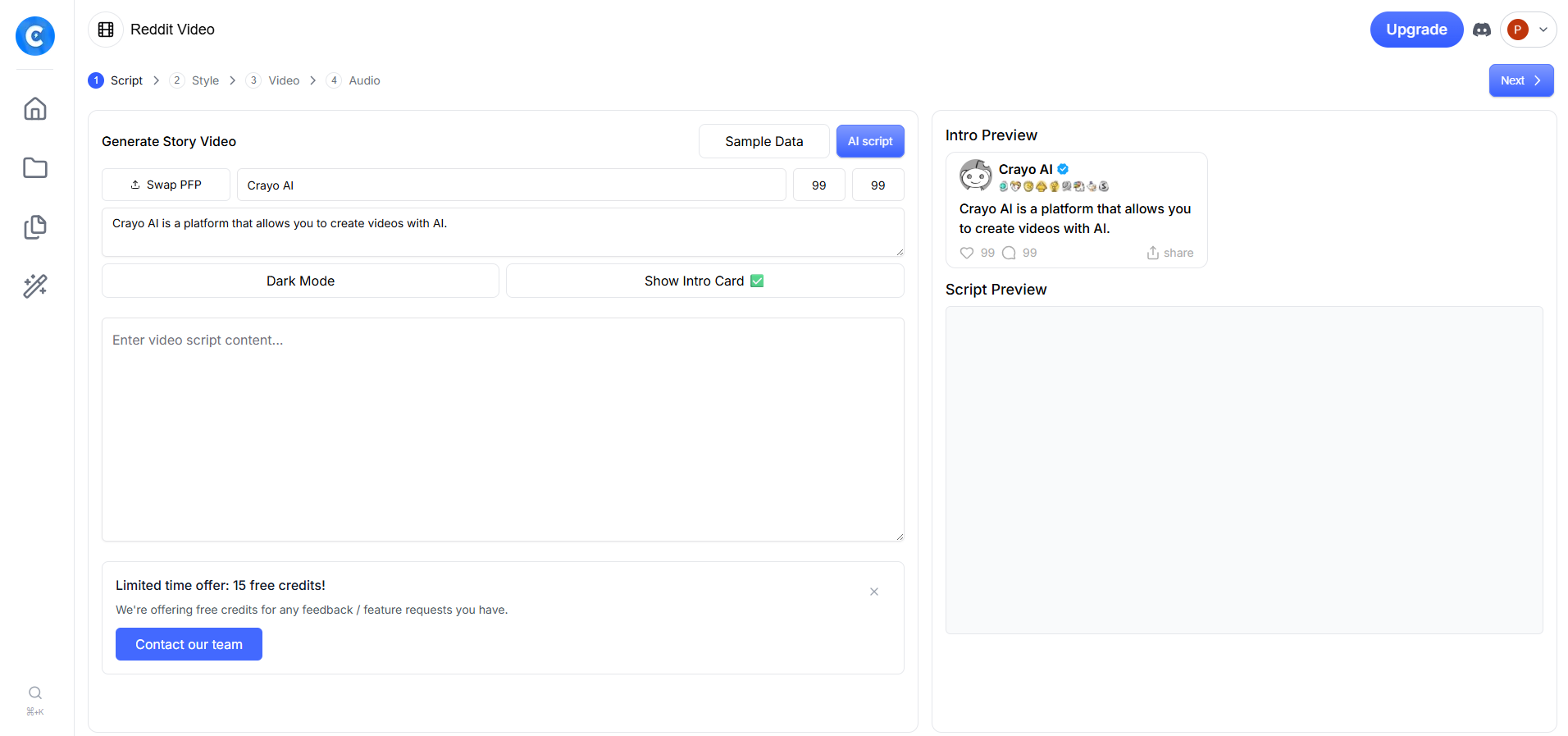
Step 2: Script

You start by:
  • Writing your own script or
  • Using Crayo’s AI script generator (topic-based)
This step supports Text-to-Video Automation, where the entire video is driven by written content rather than raw footage.
Best practice:
  • Short sentences
  • Clear pacing
  • Avoid long paragraphs

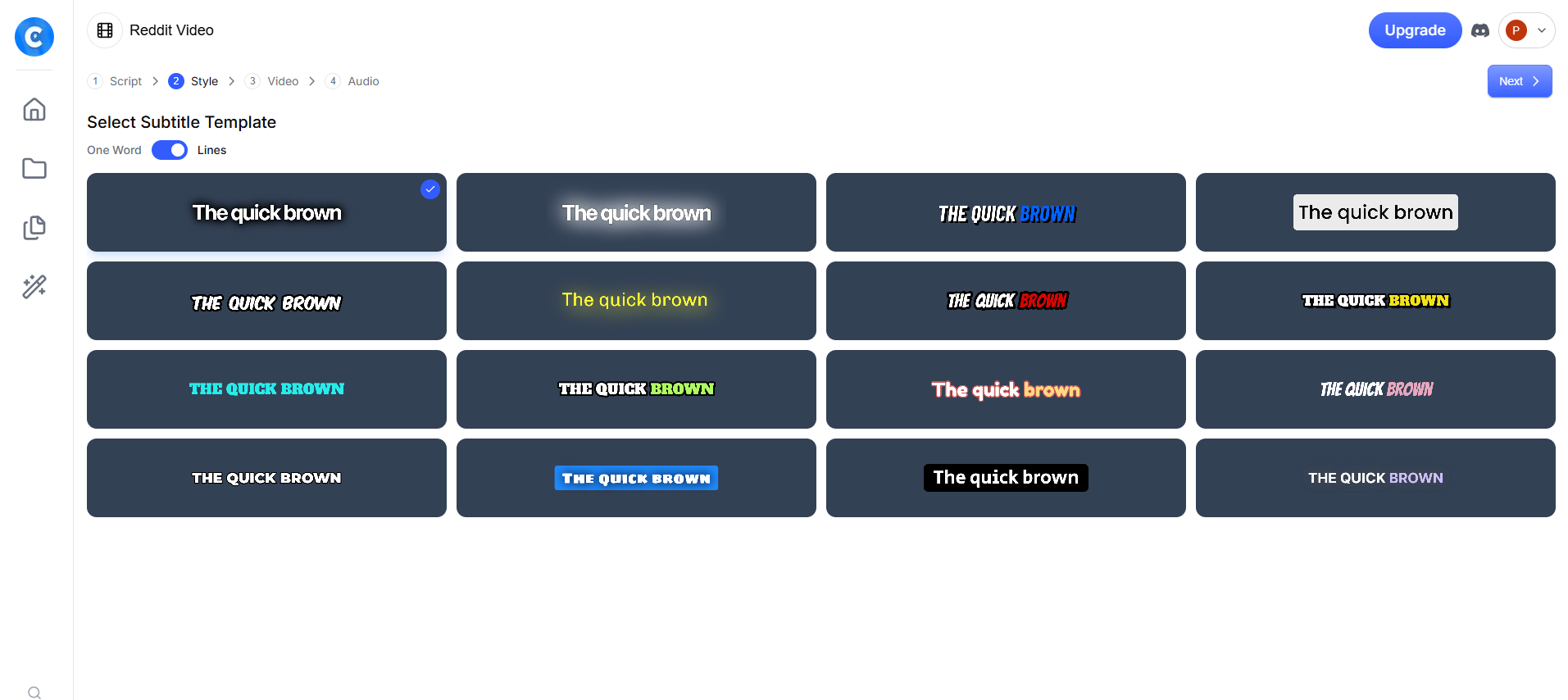
Step 3: Style (Subtitles & Layout)

You choose:
  • Subtitle template (line-by-line or word-by-word)
  • Font style and emphasis
  • Dark/light layout options
This is where Crayo shines as an AI video editor online free (trial-based) experience for beginners — no timeline editing required.

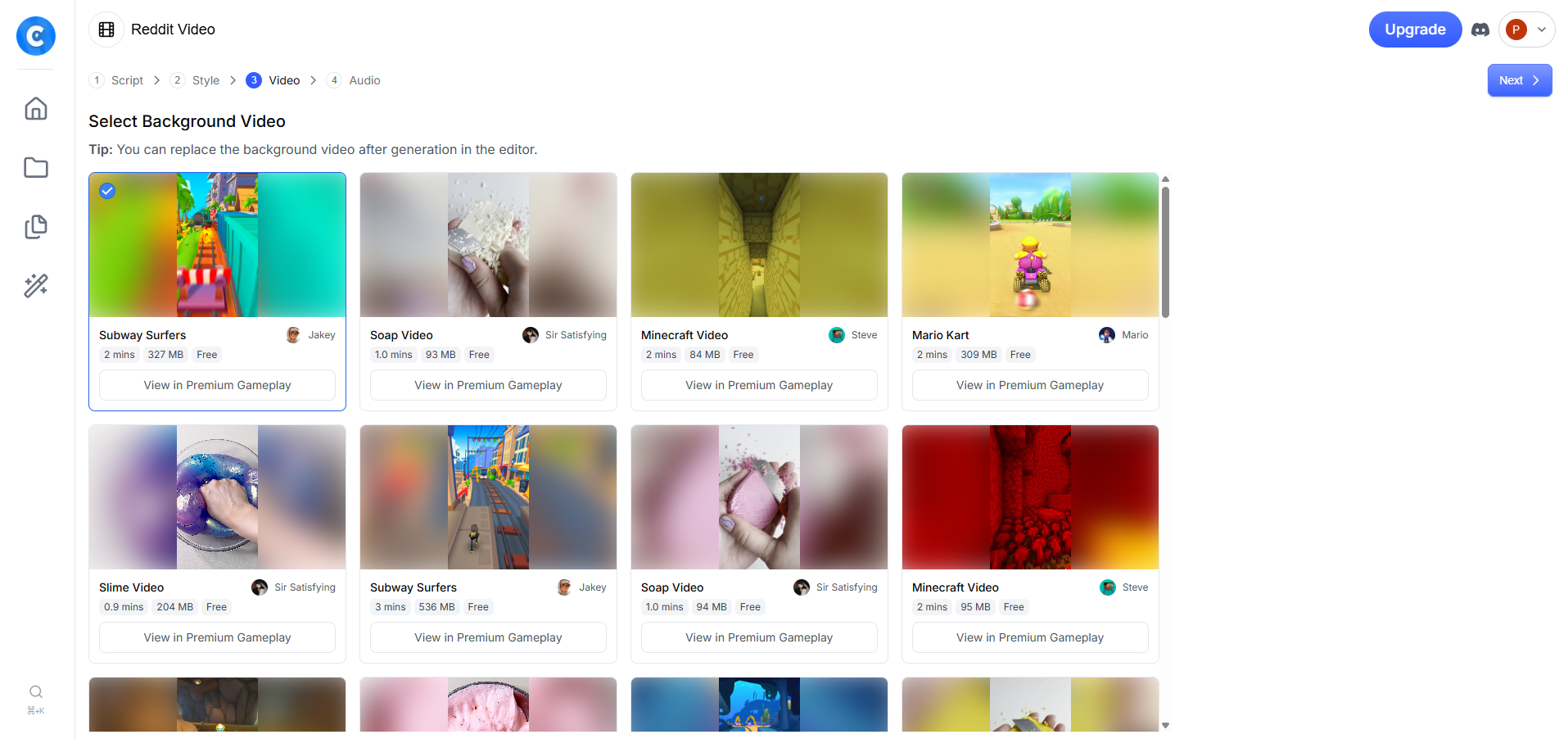
Step 4: Video (Background Selection)

Crayo currently supports:
  • Gameplay loops (Subway Surfers, Minecraft, Mario-style footage)
  • Visual filler videos
  • Pre-licensed background clips
This is where Crayo functions as an AI video generator from video, combining text + visuals automatically.
Important note:
Crayo does NOT convert your uploaded long video into clips automatically. It uses background videos, not your original footage.
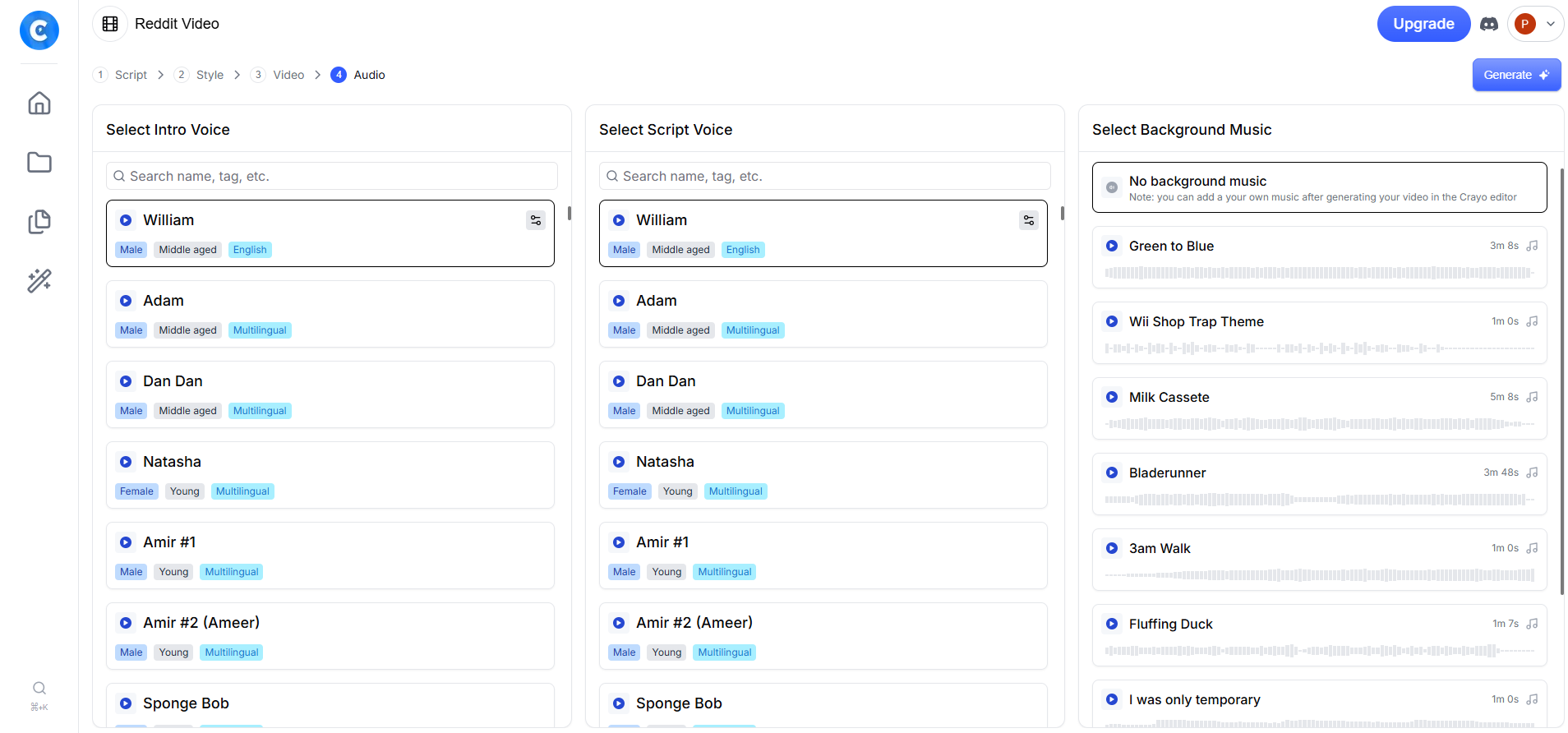
Step 5: Audio (AI Voice & Music)

You can select:
  • AI voice narrator (multiple accents & tones)
  • Background music (optional)
  • Separate intro voice & main voice
This step finalizes automation before export.

Crayo AI Pricing: Is It Worth It for Beginners?
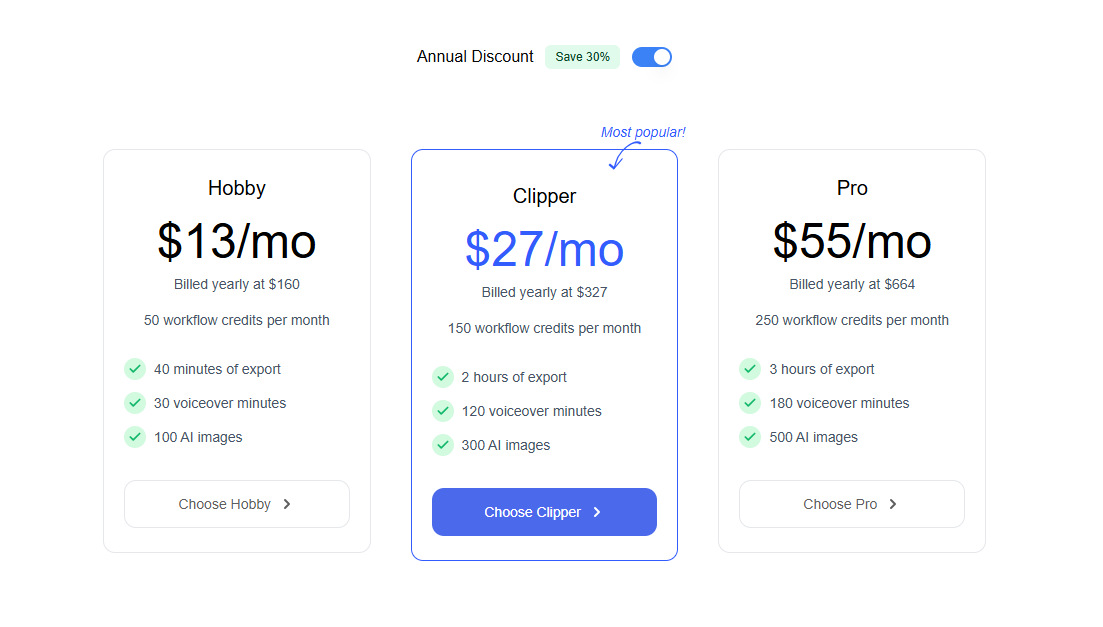
For beginners exploring tools discussed under AI video generator Reddit, Crayo AI’s pricing sits in a reasonable middle ground.

What Crayo AI Does Well

Crayo AI works best when used for:
  • Faceless content channels
  • Reddit story videos
  • TikTok narrative videos
  • Quote-based or educational shorts
  • High-volume content testing
This is why it’s often grouped with tools labeled as a free AI video generator alternative — even though full usage requires credits.

AI Video Generator Reddit: What Users Commonly Say

In Reddit discussions, Crayo AI is often mentioned as a practical tool rather than a perfect solution. Common opinions include:
  • Great for faceless content and scaling shorts
  • Faster than traditional editors
  • Limited customization compared to professional tools
These discussions reinforce that Crayo AI is designed for speed and automation, not deep creative control.

Where Crayo AI Has Clear Limitations

To be accurate and transparent:
❌ No advanced timeline editing
❌ No direct YouTube video clipping automation
❌ Limited visual customization
❌ Not ideal for cinematic or brand-heavy videos
Crayo is an automation tool, not a creative editor.

Final Verdict: Should You Use Crayo AI?

Use Crayo AI if:
  • You want speed over customization
  • You’re building faceless or automated channels
  • You need consistent short-form output
Avoid Crayo if:
  • You need full creative control
  • You edit visually complex content
  • You rely on original footage clipping
Crayo is not hype — it’s a utility tool. When used correctly, it does exactly what it claims.

RECENT POSTS

What is AI Automations? 5 Easy Steps to Go Viral

What is AI Automations? 5 Easy Steps to Go Viral

Apr 02, 2026

AI Automation Workflow Tools: 10 Effortless Steps to Build a WordPress Site

AI Automation Workflow Tools: 10 Effortless Steps to Build a WordPress Site

Mar 29, 2026

Can This AI Academic Research Assistant Save You 20 Hours a Week?

Can This AI Academic Research Assistant Save You 20 Hours a Week?

Mar 27, 2026

Toolsaday Review: Is It the Best AI Fiction Writing Tool in 2026?

Toolsaday Review: Is It the Best AI Fiction Writing Tool in 2026?

Mar 24, 2026

Stop Wasting Time on Manual Data Entry: Automate Your Workflow with Dumpling

Stop Wasting Time on Manual Data Entry: Automate Your Workflow with Dumpling

Dec 31, 2025

Save Time on Research with AnswerThis AI Academic Research Assistant

Save Time on Research with AnswerThis AI Academic Research Assistant

Dec 30, 2025

APOB AI Beginner’s Guide to AI Model Generation Create Custom Avatars and Influencers

APOB AI Beginner’s Guide to AI Model Generation Create Custom Avatars and Influencers

Dec 30, 2025

AI Song Cover Generator Comparison

AI Song Cover Generator Comparison

Dec 17, 2025

How Marketers Use MaxAI: The AI Content Assistant for Faster Research and Rewriting

How Marketers Use MaxAI: The AI Content Assistant for Faster Research and Rewriting

Dec 16, 2025

The Ultimate Flux AI Guide: From Text to 4K Video

The Ultimate Flux AI Guide: From Text to 4K Video

Dec 14, 2025

Chatfuel AI Review: The Best AI Chatbot Platform for Ecommerce

Chatfuel AI Review: The Best AI Chatbot Platform for Ecommerce

Dec 10, 2025

Clippie AI Review: The Ultimate Tool for Effortlessly Creating Viral Short Videos

Clippie AI Review: The Ultimate Tool for Effortlessly Creating Viral Short Videos

Dec 10, 2025

How to Use Systeme.io: A Step-by-Step Guide to Build Landing Pages and AI Automations

How to Use Systeme.io: A Step-by-Step Guide to Build Landing Pages and AI Automations

Dec 10, 2025

What Is AI Automations? A Practical n8n AI Workflow Automation Review (2025)

What Is AI Automations? A Practical n8n AI Workflow Automation Review (2025)

Dec 05, 2025

Draftbit vs FlutterFlow – A Practical Comparison for No-Code App Builders

Draftbit vs FlutterFlow – A Practical Comparison for No-Code App Builders

Nov 12, 2025

Top AI Video Generation Tools Free For Effortless Content Creation

Top AI Video Generation Tools Free For Effortless Content Creation

Nov 07, 2025

Storyshort AI Review: The Ultimate AI Video Generation Tool for Content Creators

Storyshort AI Review: The Ultimate AI Video Generation Tool for Content Creators

Nov 02, 2025

Autoshort AI: The Ultimate Free Video Creator AI for Effortless Short-Form Video Creatio

Autoshort AI: The Ultimate Free Video Creator AI for Effortless Short-Form Video Creatio

Nov 01, 2025

Fliki AI: Create AI Video Free Online with Powerful Text-to-Video Automation

Fliki AI: Create AI Video Free Online with Powerful Text-to-Video Automation

Oct 30, 2025

Comprehensive Review of Faceless.Video: The Ultimate AI Video Generator from Script

Comprehensive Review of Faceless.Video: The Ultimate AI Video Generator from Script

Oct 17, 2025