Oct 30, 2025|Jully
Fliki AI: Create AI Video Free Online with Powerful Text-to-Video Automation
1. Introduction to Fliki AI: What You Need to Know
Fliki AI is a web-based platform transforming text into videos. Whether you paste a blog post, script, or URL, Fliki AI helps you generate a video with voiceover, visuals, subtitles, and optional avatar. Key differentiator: it lets you create AI video from text free (via the free tier) and builds one of the most accessible workflows.
Rather than traditional editing, Fliki AI emphasizes automation: text → scenes → voice + visuals → export. For anyone wanting to quickly create AI video free online, it’s designed with simplicity in mind.
2. Who Should Consider Using Fliki AI?
-
Content creators make TikTok, YouTube Shorts, Instagram Reels — particularly faceless or voice-over videos.
-
Affiliate marketers & e-commerce sellers who need an AI video generator from script to produce product videos fast.
-
Bloggers & SEO teams wanting to repurpose content — Fliki’s blog/URL input is strong.
-
Educators & coaches who want to turn lessons into narrated videos.
-
Small businesses that want to create AI video from text free without hiring editors.
-
Agencies produce volume content and need speed & templating.
If your workflow requires cinematic motion graphics, Fliki AI may not be ideal. But if speed, voiceovers, and simplicity matter, it fits.
3. Fliki AI’s Standout Features
-
AI script-to-video automation
-
2,000+ ultra-realistic AI voices (US/UK accents included)
-
100+ AI human avatars
-
Blog-to-video converter
-
10M+ stock assets
-
Instant subtitles (~95% accuracy)
-
Templates for TikTok, Reels, YouTube
Fliki AI helps you produce professional content fast — even if you’re a complete beginner.
4. Side-by-Side Comparison: Fliki vs Synthesia vs Pictory
Unified Comparison Table (Full Data Overview):
| Category | Fliki AI | Pictory AI | Synthesia AI |
| Core Functionality | Text-to-video, AI voiceovers, AI avatars | Blog-to-video, long-form editing | Avatar-to-video, corporate presenter videos |
| Text-to-Video Automation | ✔ Strong (auto scenes + voices + media) | ✔ Strong (best for long text) | ✔ Basic (requires avatar-driven flow) |
| Blog/URL to Video | ✔ Yes | ✔ Yes (Pictory’s strongest feature) | ✘ No |
| AI Voiceovers | 2,000+ voices / 80+ languages | ~60 voices / 30+ languages | ~130 voices / 120+ languages |
| AI Human Avatars | 100+ avatars | ✘ None | 160+ studio-quality avatars (best in market) |
| Subtitle Accuracy | ~95% | ~87% | ~94% |
| Media Library | 10M+ stock assets | ~3M | ~1M |
| Ease of Use | Very easy, beginner-friendly | Medium | Medium (avatar setup required) |
| Objective Strengths | Best voice quality, fast render, low cost per minute, strong automation | Best for repurposing blogs/webinars, stable editor | Best avatars, best lip-sync, enterprise-grade |
| Objective Weaknesses | Avatars less realistic vs Synthesia, templates limited | Weak voiceovers, no avatars | High price, very limited minutes on basic plans |
Pricing Comparison (Monthly Costs)
| Plan | Fliki AI | Pictory AI | Synthesia AI |
| Free Plan | 5 min/month | Trial only | 3 min/month |
| Basic Plan | $21/mo – 180 min | $19/mo – ~200 min | $29/mo – 10 min |
| Premium | $66/mo – 600 min | $49/mo – ~600 min | $89/mo – 30 min |
| Cost per Minute | $0.11 | $0.08 | $2.96 (highest) |
Speed & Performance Comparison
| Metric | Fliki AI | Pictory AI | Synthesia AI |
| Render Speed (1-min video) | 45–60 sec (fastest) | 60–90 sec | 90–120 sec |
| Render Error Rate | <2% | ~5% | ~3% |
| Lip-Sync Quality | 93–95% | 87% | 95% (best) |
-
Fliki offers the most cost-effective minutes for script-to-video automation.
-
Synthesia leads to avatar realism and corporate training use-cases.
-
Pictory excels at turning blogs/webinars into video quickly.
5. Getting Started with Fliki: A Quick Step-by-Step Guide
Step 1: Choose Your AI Voice or Avatar
Step 2: Paste Your Script or Import a URL
-
scene structure
-
narration
-
subtitles
-
relevant visuals
Step 3: Let Fliki Automatically Build Your Video
Step 4: Customize Your Video (Optional)
You can fine-tune:
-
Stock clips
-
Your own uploads
-
Subtitles
-
Branding colors
-
Avatar scenes
Customization remains beginner-friendly while offering flexibility for advanced users.
Step 5: Export Your Video to HD
The free plan includes a watermark but still allows you to create AI video free online before committing to a paid plan.
6. Pricing Review (2025)
-
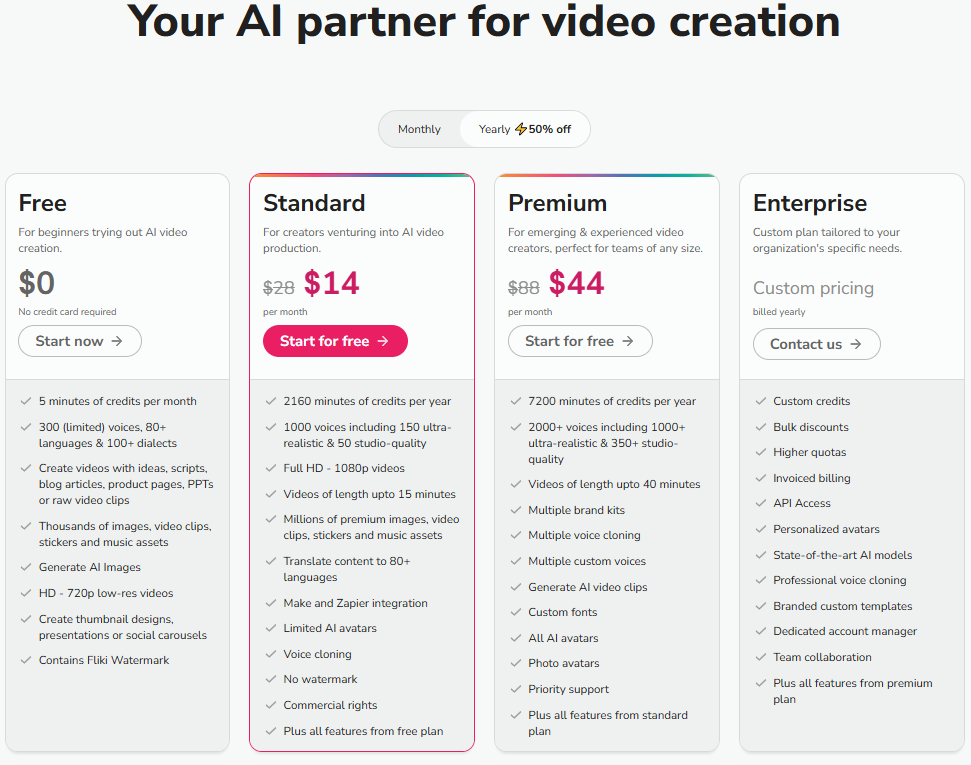
Free Plan: 5 minutes/month (watermark)
-
Standard $21/month: 180 minutes, HD export, premium voices
-
Premium $66/month: 600 minutes, AI avatars, brand kits, faster rendering
7. Advantages & Disadvantages
Advantages:
-
Very natural voiceovers with US/UK accents.
-
Simple workflow: minimal editing skill required.
-
Fast script-to-video automation — ideal for volume.
-
Affordable minutes compared with similar avatar-driven tools.
-
Supports multiple languages, avatars, and templates.
-
Great for repurposing text-based content into video.
Disadvantages:
-
Avatars are still less realistic than top avatar-specialist tools.
-
Advanced motion graphic capabilities are limited compared to full editors.
-
The free plan is basic: watermark + limited minutes.
8. Consumer Reviews & Public Ratings
| Platform | Score |
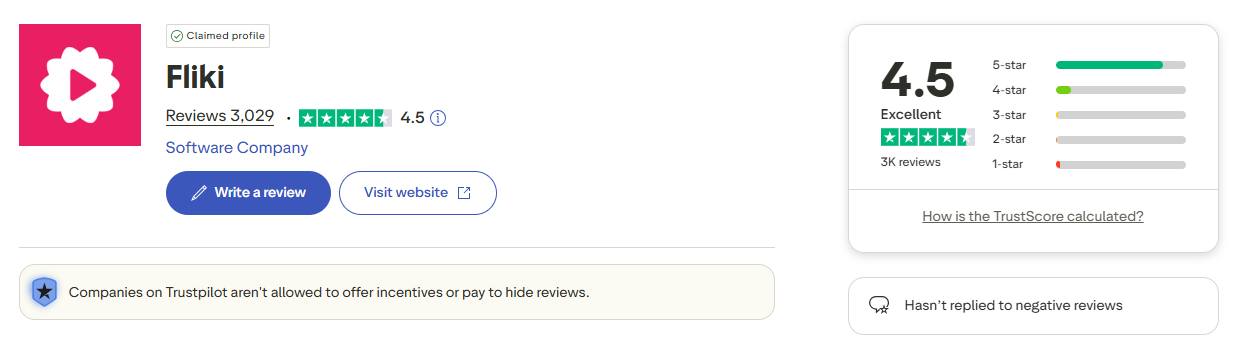
| Trustpilot | 4.8/5 (1,100+ reviews) |
| Capterra | 4.8/5 |
| G2 | 4.8/5 |
| Overall Sentiment | 96% positive |
Users praise its natural voice quality, simple workflow, and excellent value for money.
The most common complaint involves avatar realism and limitations on the free plan.
9. Conclusion: Is Fliki Worth It?
In the era where video content rules, being able to create AI video free online is a major advantage. Fliki AI delivers an accessible, high-quality solution — especially for creators, marketers, educators, and small businesses. With competitive pricing, excellent voice quality, and strong automation, it’s one of the best text-to-video AI software tools available today.
If your goal is speed, simplicity, and volume (rather than high-end cinematic production), Fliki is an excellent choice. When avatar realism and ultra-premium motion are your priority, you may consider alternatives like Synthesia. But for most users wanting fast, reliable results, Fliki hits the sweet spot.
For more expert reviews, in-depth tool comparisons, and actionable strategies on scaling your video marketing with artificial intelligence, be sure to bookmark and explore the Peraiz Blog.
10. FAQs
Q1. Can I really create AI videos free online with Fliki?
Yes — you can start with the free plan and export videos with watermarks.
Q2. Is Fliki a free AI human video generator?
Yes, the free tier allows avatar/video generation, though with limitations.
Q3. Does Fliki support script-to-video conversion?
Yes — this is a core function; it’s an AI video generator from script.
Q4. Can I create AI videos from text free?
Yes — you can input text and generate video under the free plan.
Q5. How does Fliki compare to Synthesia?
Fliki offers better value and voice realism, while Synthesia leads with avatar sophistication and enterprise features.